TeraBox vs Google Drive: Ultimate Cloud Storage Guide for 2026
Choosing a reliable cloud storage service in 2026 is more important than ever, especially as digital data continues to grow rapidly. Two well-known platforms—TeraBox and Google Drive—offer very different benefits depending on your needs.
While TeraBox attracts users with its massive free storage, Google Drive stands out due to its performance, security, and seamless integration with productivity tools.
In this guide, you’ll get a detailed, easy-to-understand comparison to help you decide which platform fits you best.
🔍 What is TeraBox?
TeraBox is a cloud storage solution designed for users who need large storage space without spending money. It is especially popular among users who store media-heavy files.
⭐ Key Features:
- 1TB (1000GB) free storage
- Automatic file backup and syncing
- Password-protected sharing
- Personal Vault for private files
- Apps for Android, iOS, and desktop
👉 Best for: Users who want maximum storage for free and basic backup functionality.
🔍 What is Google Drive?
Google Drive is one of the most trusted and widely used cloud platforms globally. It is part of the Google ecosystem, making it highly efficient for both personal and professional use.
⭐ Key Features:
- 15GB free storage (shared across services)
- Integration with Gmail, Docs, Sheets, and more
- Real-time collaboration tools
- Cross-device syncing
- Advanced file management
👉 Best for: Students, professionals, and teams who need collaboration and reliability.
How to Permanently Delete Your TeraBox Account
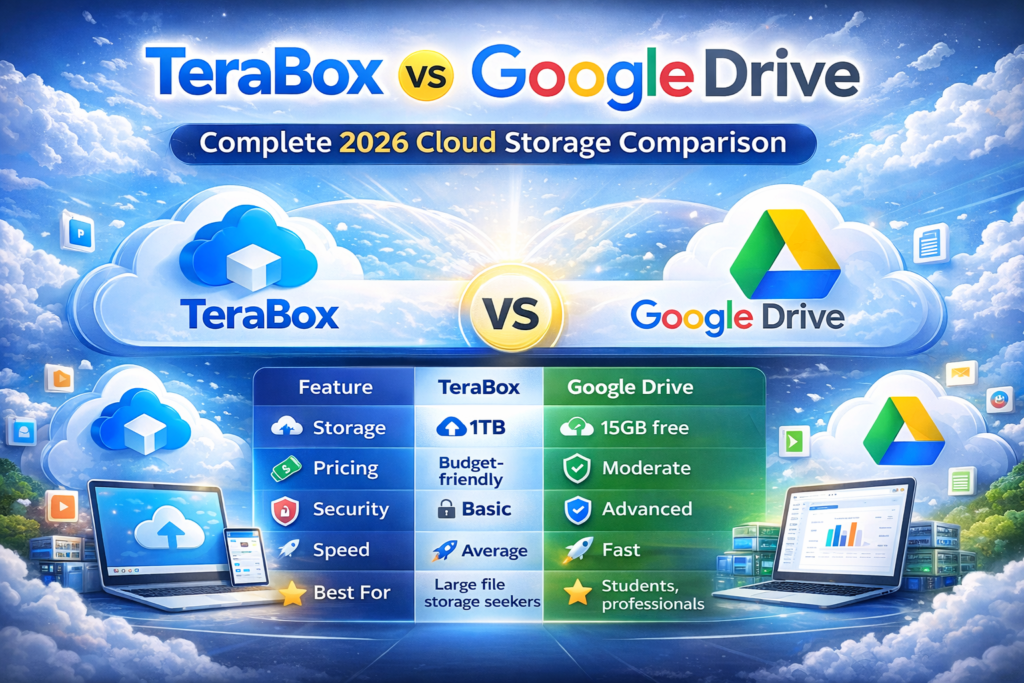
⚖️ TeraBox vs Google Drive: Quick Overview
|
|
|
|||
|
Free Storage |
1TB |
15GB |
|||
|
Pricing |
Budget-friendly |
Moderate |
|||
|
Security |
Basic |
Advanced |
|||
|
Speed |
Average |
Fast |
|||
|
Sharing |
Good |
Excellent |
|||
|
Collaboration |
Limited |
Industry-leading |
|||
|
Integration |
Minimal |
Strong ecosystem |
💾 Storage Capacity Comparison
📦 TeraBox Storage
TeraBox clearly dominates when it comes to storage space:
- 1TB free storage (huge advantage)
- Suitable for videos, backups, and large files
📦 Google Drive Storage
Google Drive offers:
- 15GB free storage (shared with Gmail & Photos)
- Expandable via paid plans
👉 Conclusion:
If storage size is your priority, TeraBox is unbeatable.
🔐 Security & Privacy Comparison
🔒 TeraBox Security
- SSL/TLS encryption
- Server-side protection
- Password-protected links
- Personal Vault
However, it lacks zero-knowledge encryption, meaning data privacy may not be as strong.
🔒 Google Drive Security
- Two-factor authentication
- Advanced encryption standards
- Malware and spam protection
- Regular security updates
👉 Conclusion:
Google Drive offers stronger security and better trust for sensitive files.
🤝 File Sharing & Collaboration
📤 TeraBox
- Link sharing
- Password protection
- Limited collaboration tools
📤 Google Drive
- Real-time editing (Docs, Sheets, Slides)
- Permission control (Viewer, Editor, Commenter)
- Team collaboration via Workspace
👉 Conclusion:
Google Drive is the clear winner for teamwork and collaboration.
⚡ Speed & Performance
🚀 TeraBox
- Slower upload/download speeds
- Ads in free version
- Performance may vary
🚀 Google Drive
- Fast syncing across devices
- Smooth uploads and downloads
- Reliable performance
👉 Conclusion:
Google Drive delivers a faster and more stable experience.
💰 Pricing Comparison
💵 TeraBox
- Free: 1TB
- Paid plans: Affordable
- Focus on low-cost storage
💵 Google Drive (Google One)
- Free: 15GB
- Paid plans: Higher cost but premium features
👉 Conclusion:
TeraBox is cheaper, but Google Drive provides better overall value.
🎯 Which One Should You Choose?
✅ Choose TeraBox if:
- You need huge free storage
- You store movies, photos, or large files
- You want a budget-friendly solution
- You don’t store sensitive data
✅ Choose Google Drive if:
- You need strong security
- You work with teams or clients
- You use Gmail or Google Docs
- You want fast performance
- You store important documents
Conclusion
Both platforms serve different purposes:
- TeraBox is ideal for users who want massive free storage without spending money.
- Google Drive is better for professional work, collaboration, and secure file handling.
👉 If your priority is space, go with TeraBox.
👉 If your priority is security and productivity, Google Drive is the smarter choice.
Frequently Asked Questions (FAQ)